The four things people call ‘quality’
Video quality is not one number. Resolution describes pixel dimensions; bitrate describes how much data is used over time; the codec determines how those bits are compressed; and the source determines what quality existed before a platform processed it.
A 1080p label therefore does not guarantee that two videos look equally good. A heavily compressed 1080p rendition can contain less visible detail than a well-encoded lower-resolution file.
- Resolution: the pixel dimensions, such as 1920 × 1080.
- Bitrate: data used per second of video.
- Codec: the compression format, commonly H.264 for broadly compatible downloads.
- Frame rate: how many frames are shown each second.
Why platforms create multiple versions
Social platforms routinely prepare different renditions so a post can play on different screens and network conditions. The version exposed for a public post may therefore be a platform-generated derivative rather than the creator's camera original.
ContentDown does not label an unavailable source file as ‘original’. Where a platform exposes quality choices, the downloader presents the choices it can actually retrieve.
Choosing a download
Choose the highest resolution when preservation matters and storage or bandwidth is not a concern. A smaller rendition is often sufficient for messaging, reference or a small screen. If you intend to edit media, preserve the highest-quality lawful source you have access to rather than repeatedly transcoding copies.
A worked example: why pixels alone mislead
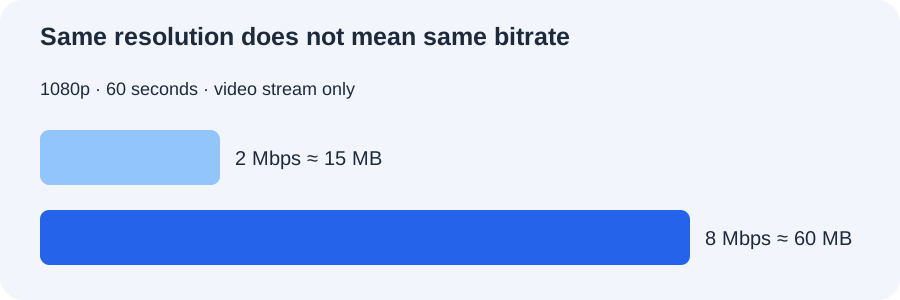
Imagine two 60-second 1080p clips. At an average video bitrate of 2 Mbps, the video stream contains about 15 MB of data. At 8 Mbps, it contains about 60 MB. Both files have the same dimensions, yet the encoder has very different amounts of information available to represent motion, texture and fine detail. Actual results also depend on codec, source footage and encoding settings.
You can reproduce this calculation using ContentDown’s file-size estimator: enter one minute, then compare 2 Mbps and 8 Mbps. Remember to include audio bitrate if estimating a complete file.
A practical quality-selection checklist
First check the available resolution, then consider how you will use the file. For viewing on a phone, a smaller rendition may be adequate; for permitted editing or archiving, choose the highest-quality source you can lawfully access.
Do not confuse an interface label with a guarantee of visual fidelity. ContentDown only exposes compatible media representations returned for the public post; it cannot reconstruct detail lost during the platform’s upload and transcoding process.